
Most factories read digital product catalogs as one task: turn the printed brochure into a PDF and put it on the site. That solves distribution, not comprehension. A buyer downloads sixty pages, finds the model they care about on page eight, and discovers there is one front-view photo with the rest of the specification available by email — two days later. Information leaks away at every hop, and what finally arrives as an inquiry is usually just "send me a price".
Replacing the PDF with a 3D catalog is not a rebuild of every page. It swaps the part of the brochure that consumes the most explanation — structure, assembly, model differences — for something the buyer can inspect alone. Specification tables, certifications and application notes should stay exactly where they are.
The PDF's weakness is the type of information, not the layout
Brochures are good at categorisation. Series, model numbers, size ranges, material options, certification lists — tabular layouts handle all of it, and page-turning is fast. In the early stage of a purchase, where a buyer is checking whether a supplier even covers their category, this is efficient.
The friction starts later. Once two or three models are shortlisted, the questions become spatial: will this structure fit my line, will this port position interfere with something. Static images cannot answer that. The standard workaround is more photography, a short video, or a live call — all of which consume staff time and none of which scale. The tenth buyer asking the same question gets the same explanation.
Model differences make it worse. Five variants in one series look nearly identical in photographs, while the differences sit in internal structure or port configuration. Buyers pick wrong, and wrong picks turn into returns or rework. In custom industrial equipment that cost is not small.
What the 3D version adds is verification
Once the model is in a browser, the buyer has new moves: rotate to see the rear port layout, separate the housing to count internal chambers, click a component for its specification, switch models to see where the structure changes. In each case the buyer is checking a judgment independently rather than waiting to be told.
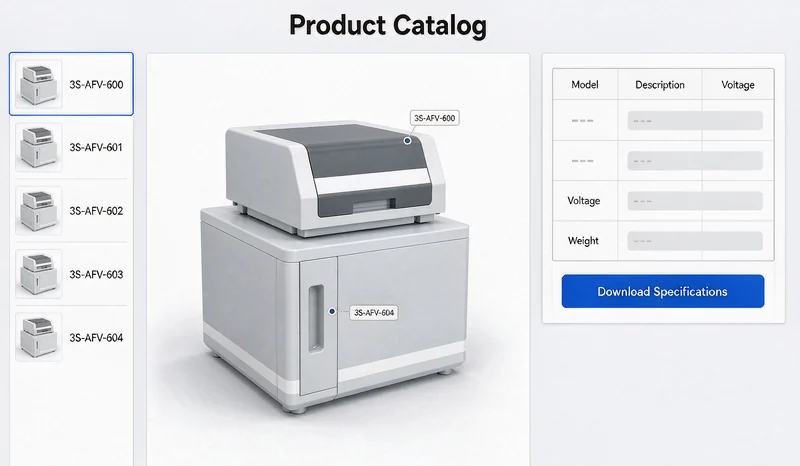
The difference shows up in inquiry quality more than in traffic. The general pattern across the industry is that inquiries arriving after an interactive view are more specific — asking about a component's material or suitability for a particular operating condition, instead of "how much". How much it improves varies by category, and any vendor quoting a fixed percentage should be treated with suspicion.
As with building equipment interaction from CAD data, the real work is modelling and interaction planning, not page development. An inaccurate model cannot be rescued by clever interaction.
Cost and maintenance decide the case
Budget goes to three places: modelling, scaled by the number of variants and structural complexity; interaction development, depending on whether selection, disassembly or parameter linking is needed; and maintenance after launch. The first two are one-off. The third is ongoing, and it is the one most companies forget to price.
Plan for change before signing. Industrial product lines iterate slowly but they do iterate — two or three new models a year, a port moved once. If every model is a standalone island, each change restarts the whole pipeline. If models are built modularly with parameters exposed, a component change stays local. That difference is invisible at contract stage and glaring by year three.
Multi-use matters just as much. One dataset serving the website catalog, an offline package on a sales tablet and a booth screen dilutes the investment; building each separately multiplies it. The same principle appears in how a Web3D site differs from a standard website — the reuse rate of display assets drives long-term cost.
Some products should not get one
Simple structures, single variants, and products where buyers only compare appearance and price see little return. For a standard component or an accessory in three colors, buyers care about tolerance, material and lead time, all of which a table and good photography handle. Forcing 3D there wastes money.
The test compresses to one question: does the buyer need to look inside, or compare variants, before deciding? If yes, 3D earns its place. If no, invest in the catalog layout and the specification tables instead. The same reasoning governs choosing between 360 spin and a configurator — the tool has to match the decision, not the fashion.
Fitting it into existing channels
A 3D catalog should not be an island. Embedded in product pages it catches organic traffic; as a link in a distributor's hand it costs less than shipping brochures; as a QR code at a booth it beats queueing for a demo. One entry point serving all three is the cheapest structure.
For overseas buyers, keep the PDF. They are used to scanning a specification sheet before asking questions, so leave a "download full specifications" link alongside the 3D view rather than forcing a new habit. Language matters too: technical text on an English page needs review by someone who knows the product. Machine-translated specifications lose trust immediately.
Across eight-plus years and more than 500 projects at XuanJi Animation, the most regretted catalog projects are the ones nobody maintained — the range changed and the page did not. If you commit to this, commit to the update process as well. Scope is described on the Web3D website development page; if your range is broad and changes often, start with how the modules will be planned.
Related questions
We already have a PDF catalog — do we need new 3D models?
Yes, but not all at once. Start with the two or three series that generate most inquiries, prove the effect, then extend. Models can come from existing CAD data; without CAD, physical measurement works, at a lower precision than engineering use requires.
Can a 3D catalog generate quotes directly?
Technically yes, if your pricing rules are already structured. Clear rules with mutually exclusive options can drive live pricing. Where pricing relies on human judgment, guided selection that outputs a configured inquiry is more realistic.
Will it slow the website down?
It will, without lightweighting. Keep a single model within two to three megabytes, show a static image first and load the 3D only on interaction. The compression approach is covered in keeping models under 2MB.