
An outdoor furniture brand came to us last year with a complaint their support team kept hearing: the product page took forever to respond, and some customers assumed the site was broken and closed the tab. We tested it on 4G. From tap to a rotatable model: eight point three seconds.
Eight seconds.
In ecommerce that number is a closed door.
The server was fine. The CDN was fine. The problem was the model.
We pulled the GLB apart: 38MB for a single outdoor sofa. Textures ate 31MB of that, mostly a set of 4K PBR maps — base colour, roughness, metalness — plus an ambient occlusion map that contributed nothing. Geometry took 6MB, and it included dozens of screws nobody would ever see, an internal support frame, and a skeleton completely hidden by the seat cushions. The client's reaction was that this was simply how large their designer's export was.
I hear that sentence a lot. It doesn't mean the designer did bad work. It means game engines and ecommerce pages want completely different things. A game can preload hundreds of megabytes and ask players to install a client. A browser cannot. Your customer is on a phone, possibly on four bars of signal, standing on a subway platform.
Some reference points. To show the same chair you can use an 800px WebP photo at 50KB, a fifteen-second product video at 5MB, or an unoptimised GLB at 38MB. All three do the same job on that page. The size difference is 760 times.
What's actually inside those 38 megabytes
Textures dominate, usually seventy percent or more, and half of that is surplus resolution. A chair renders at roughly 800px wide on a phone screen, and you handed it a 4096×4096 map. The other 96% of those pixels will never be displayed.
Geometry hides waste differently. The genuinely visible portion is often a quarter of what was exported; the rest is internal structure kept for the sake of completeness, thread details, hidden clips at the back.
There's a subtler form of waste too. A sofa series with six fabrics shipped as six complete GLBs, each around 30MB. A hundred and eighty megabytes total where ninety percent of the geometry is identical across all six.
Where the weight actually comes off
Geometry compression returns the most per hour of work. Draco is Google's open-source scheme: it quantises and entropy-codes vertices, normals and UVs, and decodes directly through three.js's DRACOLoader. One chair went from 6MB of geometry to just over 400KB.
That's a 93% cut with no visible change, because what got thrown away was floating-point precision, not shape.
Textures offer even more. Moving to KTX2 with Basis Universal lets the GPU read compressed textures directly instead of decoding to a bitmap and uploading it to VRAM. Texture payload drops to a fifth or a tenth of the original.
If KTX2 is too much work right now, drop 4K to 1K or 2K, delete the AO map (most ecommerce viewers don't need it — an environment map covers it), and pack the three PBR maps into a single ORM texture. That step alone usually saves 60 to 80%.
Deleting internal geometry sounds crude but it's a modelling standard, not a rescue operation. A display model should only contain surfaces customers can see, with simple closed shells standing in for anything internal. When we build furniture 3D configurators, the spec sheet says plainly: don't model what can't be seen, represent screw holes with texture. That one rule removes 20 to 30% of the triangle count.
LOD tiers exist for mobile. Ship high, medium and low variants of each product, serve the desktop model to desktop devices, mid to phones, and fall back to low on weak hardware. The low tier can be twenty thousand triangles and look nearly identical at arm's length. Let the customer rotate it, then quietly swap in the high version after they stop moving for two seconds.
Volume is under control and it's still slow. That's a load-order problem.
This is the layer most teams miss. You compressed the model to 1.5MB and the page still janks, because the main thread is blocked. The 3D library parses the model, builds the scene, computes lighting and initialises controls all at once, and the browser's render thread has nothing left for the user. Nothing responds.
The fix is to hand over the first frame. Serve a static poster image on entry — a good-angle render of the model, twenty-something kilobytes. The customer sees a product that's already there while the real model loads in the background. When it's ready, cross-fade one into the other. Most people never notice the switch.
One layer deeper: keep the 3D library off the critical path. A full three.js bundle runs over two hundred kilobytes, and you'll use maybe half of it. Import only what you need to get under eighty, and use dynamic import so it arrives only when the customer actually interacts. Let the page be readable, scrollable, and able to add to cart first. The 3D layer is the enhancement. It should never stand in front of anything.
What "good" looks like
These are our numbers, not an industry standard, but following them keeps you out of trouble.
Total transfer for the initial model plus textures: under 2MB. That's a hard line. Mobile gamers tolerate more; ecommerce customers don't.
On a mid-range Android phone — we test on Redmi devices — reaching interactivity within three seconds is acceptable, two is good. Frame rate above 50 during interaction; below 40 and people feel the drag. And first scrollable paint should never depend on the 3D at all.
Performance budgets matter more than any single trick. When we write the 3D product interaction plan for a project, the budget goes into the contract appendix: total model weight, first-frame timing, and the fallback for low-end devices. Once it's written down, every downstream decision has a reference, and you don't discover on launch day that it won't run on a phone.
The sequencing mistake
Plenty of projects build the 3D first and figure out embedding afterwards. The model comes out beautifully detailed, the page can't carry it, and everyone goes back to decimate and re-compress. That's the same work done twice.
Reverse it. Decide which devices the page must serve, how much weight it can carry, and which three angles matter most to the customer — then design the model to that brief. This is the same logic as the 3D product interaction plan; loading performance isn't a separate project phase, it's the same decision.
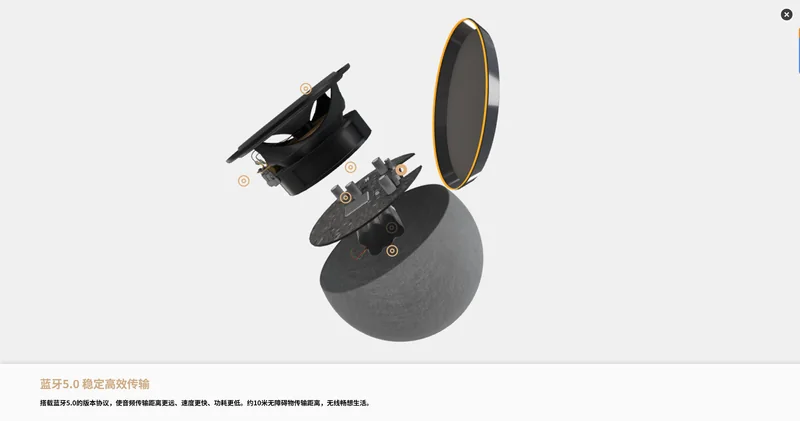
We built a Shopify 3D display case for a Bluetooth speaker brand on a 1.2MB total budget. Modelling planned its polygon count and texture specs against that number from day one. No rework.
One thing worth saying plainly
The case for Web3D in ecommerce is solid — dwell time, add-to-cart rate, return rate all have published numbers behind them. No argument there.
The premise is that it loads. A model that takes eight seconds to spin loses the customer in the second. Everything downstream — interaction design, material fidelity, price integration — never happens.
That's why this belongs at the front of the project, not the optimisation phase.
FAQ
What model size is appropriate for Web3D on mobile ecommerce?
Keep total transfer under 2MB and target three seconds to interactivity on mid-range Android. Above 5MB you need LOD tiers and a poster frame, or conversion drops noticeably on weak devices and slow connections.
Is Draco compression necessary? Any compatibility issues?
Draco is open source from Google, natively supported by all major browsers plus three.js and model-viewer. The only thing to plan for is the decoder — about 200KB, gzippable — which you load in parallel with the model itself.
Can existing oversized models be compressed without remodelling?
Yes. Texture and geometry compression are pure post-processing and need no remodelling. But if the model itself was built badly — complete internal structure, excessive polygon count — it will still be heavy after compression, and that case needs a display-specific rebuild.
Does image quality suffer at 2MB?
No. What gets removed is surplus texture resolution and floating-point precision, both invisible on a phone screen. Visual quality is driven by material parameters and lighting setup, and neither of those costs bytes.