
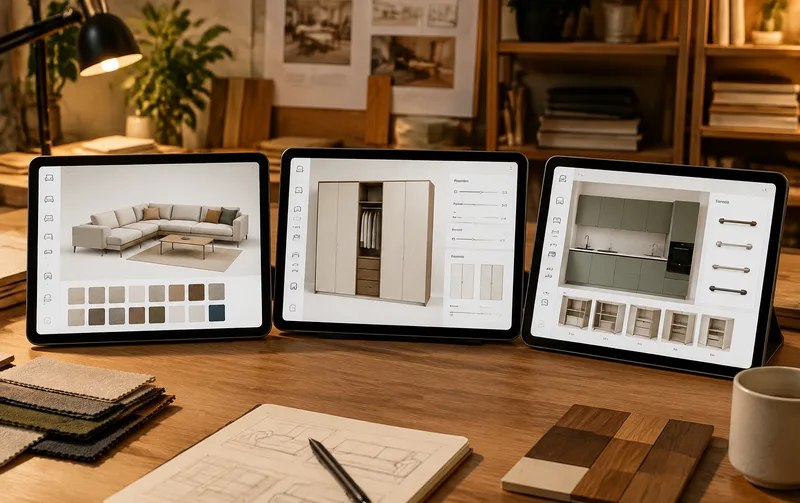
Ask ten vendors how to build a furniture 3D configurator and nine will hand you the same generic pipeline: model it, texture it, write the rules, wire the pricing, launch.
The pipeline isn't wrong. It just doesn't solve your actual problem. Sofas, wardrobes and cabinets follow three completely different product logics, and forcing one approach onto all three produces something that's always slightly off — either the rules are so rigid customers can't choose, or so loose they configure pieces the factory can't build.
Three product lines, three separate conversations.
Sofas: combinations and dimensions move together
A three-seater lets customers choose fabric, leg style, arm shape, whether there's a chaise, whether it's ten centimeters wider.
Sounds contained until you notice the options pull on each other. Add the chaise and the seat depth changes. Widen it and certain fabric widths no longer work. The hard part of a sofa configurator isn't visual quality — it's untangling the combination matrix and the dimensional logic underneath. Modular sofas are the easier case because each module stands alone. One-piece sofas are where projects stall: change a dimension and the cushions, backrest and arms all need proportional adjustment, which means the model can't be static, it has to be parameter-driven.
At XuanJi Animation we start furniture 3D configurator projects by drawing the combination matrix — which option pairs are valid, which aren't — and walking it line by line with the client's product manager before anyone opens a modeling tool. Skip that step and everything downstream is rework.
Wardrobes: dimensions lead, pricing follows the square meter
Wardrobes are a different species entirely.
The first thing a customer does isn't picking a color. It's measuring the wall. So the first input has to be dimensions — width, height, depth — with the carcass rebuilding itself as they type: door count, internal dividers, drawer positions all re-laying out to the new size. Materials and hardware come later, once the box exists.
Pricing follows the same logic shift. Sofas price per unit; wardrobes price by projected area, with board usage, door area and hardware counts all driven by dimensions. That calculation belongs in the back end, and it needs to fire on every dimension change — not wait for someone to manually quote after an inquiry.
Cabinets: rule-heavy, and the exclusions decide everything
Cabinets are the hardest of the three, and it has nothing to do with the model.
It's the rules. A particular carcass paired with a particular door blocks the drawer. A certain worktop with a certain sink leaves the cutout in the wrong place. Corner units carry hard dimensional constraints. Inside the factory these relationships are common sense; on a web page they have to be written as explicit logic, one line at a time. Miss one and a customer configures something unbuildable, the order comes back, and everyone redoes it.
So half the cabinet workload is modeling and half is sitting with the senior craftsman reconciling compatibility tables. We hit the same wall building a machinery 3D configurator for a dispensing equipment client — accessory compatibility at the same level of complexity, resolved the same way, one table at a time.
What all three share
The modeling standard is shared: parts separated, materials layered, built to a configurable spec so one asset feeds the configurator, marketing renders and AR alike. The rules layer is shared: exclusions, dependencies and pricing live in a configurable layer instead of being hardcoded into the page, which means an operator can adjust a rule from the admin panel instead of filing a ticket for a redeploy. The pricing interface is shared too — whatever the product line, the configuration needs to produce a structured quote with enough fields for a salesperson to send it straight out.
Get those three foundations right and adding a product line means swapping models and rule tables. Cut corners on them and every new line restarts the project from zero, at double the cost and time.
FAQ
Can we do all three lines at once?
Not advisable. Ship one, prove the data and the flow, then copy the pattern to the next. The modeling standard and rules structure from the first line eliminate most duplicated work on the second. Projects that start with all three usually stall halfway through the second.
What budget range are we talking about?
It scales with configuration depth. Material and color swapping sits at the low end; dimension-driven pricing adds a tier; rule-heavy cabinet work adds more. Our 3D configurator cost breakdown maps the ranges and gives furniture projects a reasonable coordinate.
What if we don't have CAD files?
Looking for a furniture 3D configurator build? Send over your catalog and pricing rules, and we will scope the first product line before quoting anything.