
A 3D digital color card is not a photograph of a physical fan put online. It is a page where a buyer can judge what a color will look like on the actual product, under an actual finish, from a screen. Those are different jobs. A physical fan answers "what color is this code" with production-grade accuracy. A digital color card answers "what will this look like on my product" — and that question has three variables in it, not one.
For coatings, building materials and custom furniture, color selection is where deals slow down. Buyers compare chips in a showroom, go home and second-guess, then worry about the result until the paint is dry. Most of that back-and-forth is avoidable, provided the digital version is built to answer the right question.
What a physical fan is actually for
A fan exists for color matching, not color choosing. Every chip is printed on controlled stock with controlled ink and controlled gloss, so two people in two cities holding the same fan see the same color. Factories rely on that consistency for mixing, inspection and reorders. It is a production reference first.
The mismatch appears when a buyer uses it for something it was never designed to do. They are not asking what the code looks like in isolation — they are asking what it looks like on a metal housing, or on a wall that gets afternoon sun. Between the chip and that answer sit the light source, the surface finish, the viewing angle and the display. Get any one of them wrong and the judgment shifts.
The operating cost is easy to underestimate too. A full fan runs to hundreds or thousands of chips; printing, shipping and updating them all cost money, sales staff cannot carry the set, and buyers rarely read past the first few ranges. The more colors a brand offers, the worse the economics get — while the colors buyers actually pick tend to cluster.
Why screen color and painted color diverge
"Screens are inaccurate" is too blunt to be useful. A screen emits light; paint reflects it. The two rendering principles differ, so identical RGB values will never match perfectly. Accepting that up front is what makes it possible to define what "good enough" means for a digital card.
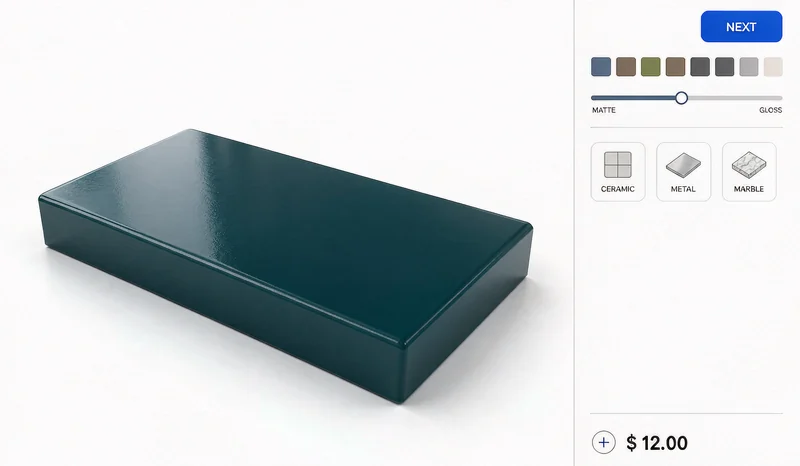
Three variables stack on top of each other. The light source sets how bright and saturated a color reads — the same panel can shift two steps between noon daylight and warm interior lighting. Gloss decides where highlights land and how tight they are; matte scatters light, high gloss pulls it into a line, and one code can look like two different colors across that range. The substrate decides texture: metallic finishes shift with viewing angle, emulsion paints read flat, wood coatings let grain through.
A card that only swaps hue has dropped the third variable. The buyer sees a flat patch wrapped onto a model, which is not what the product will look like, and the page gets abandoned after one visit. Gloss and substrate switching is the line between a demo and a tool — and a reasonable way to judge whether a vendor has done this before.
What it replaces, and what it does not
It replaces more than most teams expect. Shortlisting a color family, comparing a handful of candidates, locking a scheme, sending the result to a salesperson or designer — all of that is faster on a page, with no samples in the mail. When a digital card sits next to the product it belongs to, color decisions can move ahead of quoting, which is exactly what happens in vanity and tile pairing work.
What it does not replace is final sign-off. Where acceptance criteria exist, the industry still settles color against a physical sample, and a digital card should never be sold as a substitute. Position it as a shortlisting and communication tool, say plainly on the page that the final color is confirmed by physical sample, and both the expectation gap and the dispute risk shrink.
Demand also tends to spill sideways. Once a buyer has picked a color, the next question is which size or model it applies to, and hue alone cannot answer that — the card has to connect to configuration logic. The approach used for lighting configurators, where color temperature and shade material switch together, is a useful reference: the buyer sees a finished product rather than an isolated patch.
What to verify before launch
Start with the color data. Every code needs a traceable source — converted from an in-house formulation, or measured against a physical chip. Those two paths differ by an order of magnitude in accuracy. Custom hex input needs guardrails too: if a buyer enters a color the plant cannot mix, the page should say so, not accept it and fail weeks later.
Device consistency has to be tested, not assumed. The same model will read differently on a designer's monitor, a buyer's laptop and a salesperson's phone. That is hardware, and it cannot be eliminated — but page-level color settings can be standardized, and acceptance should compare three devices side by side instead of one. Load weight matters as well: color pages preload several material maps, and without a size budget the mobile experience is a blank screen. The compression approach in keeping models under 2MB applies directly.
Then plan for maintenance. Coating brands add and retire color ranges every year. The card needs a back end where codes can be edited without a developer, and that question is far cheaper to ask before signing than after.
Across eight-plus years and more than 500 delivered projects at XuanJi Animation, the most common cause of rework on color-card work is not technology. It is an unclear brief: who looks at this page, and what decision does it help them make. A distributor shortlisting stock, an end customer choosing a finish, and a designer building a palette need three different interfaces. Scope is described on the 3D digital color selector page; if you are unsure which case fits, describe the decision instead of the feature and we can tell you which form it needs.
Related questions
Can a 3D digital color card fully replace a physical fan?
No, and it should not be positioned that way. The digital card handles shortlisting, comparison and communication; the fan and physical sample handle final confirmation and acceptance. Making that division explicit keeps expectations in place.
A buyer says the color looks wrong on screen. Where is the problem?
Usually one of three places: only hue was implemented without gloss and substrate, page color settings are inconsistent, or textures were exported without color management. Check those before blaming the display.
Will a large color library make the page slow?
The number of codes is not the problem — one high-resolution texture per code is. Driving materials with adjustable parameters lets a single material set carry the library, with dedicated textures reserved for special-effect finishes.