
Shopify 3D product configuration hits a concrete technical wall sooner or later: too many options, not enough variants. A sofa in five fabrics, three arm styles, two depths and four leg options already runs past a hundred combinations, and adding a custom dimension pushes the number out of sight. Shopify's variant model was designed for a simple matrix — color by size. Real configuration breaks it.
So the question is not whether to build 3D configuration. It is how a configured result reaches the order. Get that wrong and every additional option digs the hole deeper.
Why variants explode
A variant is enumeration decided in advance. Every new option dimension copies the inventory, price, SKU and image. Three dimensions with three choices each gives twenty-seven variants; five dimensions with three choices each gives two hundred and forty-three. Most of those combinations will never be ordered — they exist only so the customer can choose.
Maintenance is worse. A fabric changes supplier, a color is discontinued, a price moves — all of it means editing the variant list line by line. Anyone who has done a round knows the outcome: a combination still carries the old price, or a discontinued finish is still orderable.
Shopify has raised variant limits over the years, and the current ceiling should be checked against official documentation rather than quoted from memory. But raising the ceiling does not solve the underlying problem. What you need is not permission for more variants; it is not needing a variant per combination.
Write the configuration into the order, not into variants
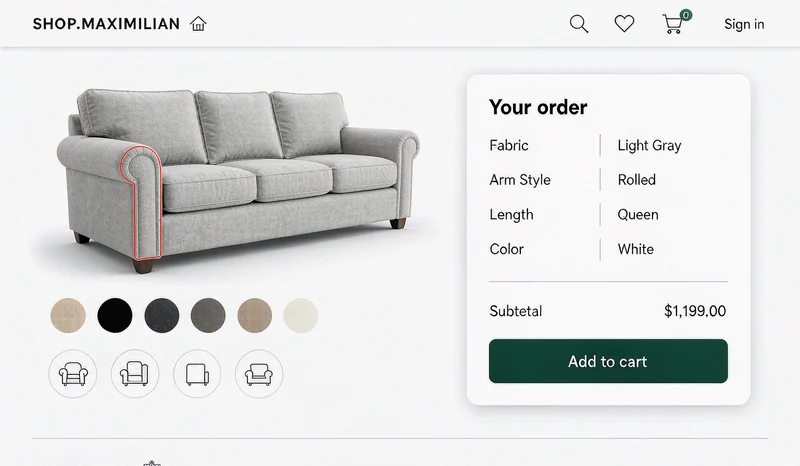
The common way around it is line item properties. The customer picks fabric, arms and legs in 3D; on add-to-cart those choices travel with the product as a set of fields, and the order detail page shows the full configuration.
The benefit is direct. The product keeps only the few variants that genuinely control inventory — the base model, typically — while everything else passes as properties. Adding an option no longer touches the variant list, and a price change no longer needs line-by-line syncing. Production actually receives better data, because properties can carry fabric codes and measured dimensions that a variant cannot express.
The trade-off is that pricing becomes your responsibility. Under variants, Shopify owns the price; under properties, the configurator must compute the total and hand it to the cart, while still accounting for discounts, tax and multiple currencies. Handled loosely, the price the customer sees and the price the order carries will diverge. How much of this you inherit depends on the route — plugins usually bundle it, custom builds write it — and the three technical routes differ sharply here.
What the order must carry after add-to-cart
This is where many projects fail: the customer adds to cart and the line item is a bare product name with the configuration missing. Fulfilment then guesses from a free-text note.
A workable order carries three things at once. Structured fields the system can read — fabric code, dimension values, component SKUs. A configuration image or code a human can look at. And a plain-language summary so support does not have to decode fields. An order with all three is a different category of work from one with a note.
For made-to-order products there is a further step: the property set needs slots mapped to production parameters. That mapping is not a developer's call. Whoever runs the factory has to confirm which data they actually need, or the fields will look complete and the floor will still be on the phone.
Existing Shopify stores also face a structural choice — rebuild the storefront around 3D, or attach a configurator on its own subpage. The integration mechanics are covered in connecting your Shopify store to 3D product display, so they are not repeated here.
When variants are still the right answer
The opposite mistake is rejecting variants entirely. If a product has two or three simple options and every combination needs its own inventory count, variants are less work — Shopify's inventory, reporting and third-party tools are all built around them, and bypassing that gives up real capability.
The test compresses to two lines: independent inventory control with a manageable combination count means variants; a combinatorial explosion, or continuous values like dimensions, means properties. Mixing is normal — base models on variants, custom builds on the configurator, in the same store.
One cost is easy to overlook: properties demand more from operations. A variant list reads as a row of SKUs anyone can interpret; a property set reads as key-value pairs that require training and a field convention agreed before launch.
What to pressure-test before launch
The fragile part of a configurator is not the interface, it is the edge cases. If fabric A excludes arm B, is that rule enforced? After a price change, does a configuration already sitting in someone's cart calculate correctly? If a customer arrives from a saved link, does the build restore? None of these surface by clicking around for ten minutes.
Mobile deserves its own pass. Small controls and imprecise touch mean a high mis-tap rate, and every combination should be walked through on a real handset before handover. Loading matters too: configurators preload several materials, and without a size budget the page goes blank — the approach is in keeping models under 2MB.
Across eight-plus years and more than 500 projects at XuanJi Animation, the most common rework on Shopify commerce work is not visual quality. It is order fields that were never aligned with production requirements, discovered only after launch. Two hours of alignment before work starts saves two weeks later. Scope is on the Web3D website development page; if the product has configuration dimensions, list the options and exclusion rules before discussing visuals.
Related questions
How many variants can Shopify hold?
The ceiling has changed over the years, so check the current documentation rather than trusting a number in an article. The better question is how many combinations your product actually produces — past a few hundred, maintenance is already unreasonable regardless of what the platform allows.
Does passing configuration as properties break inventory?
It can. Properties carry no stock, so any dimension that genuinely needs inventory control — the base model, typically — stays on a variant, and purely presentational options move to properties. Keep that split clean and inventory stays accurate.
Can we just install a 3D app from the Shopify App Store?
For simple color and material swaps, often yes. Complex rules usually cap out. The test: are there exclusions between options, is price calculated by dimension, does production need parameters? Any one of those and an app template will hit its limit quickly.