
A wardrobe 3D configurator and wardrobe design software get confused constantly, and they are not the same product. Design software lives on a designer's computer and outputs renderings plus cutting lists. A configurator runs on the brand's own product pages, letting customers swap door styles, browse color swatches and adjust interiors themselves, then walk straight into a configured inquiry. If the goal is selling online, you need the second one, and buying the wrong thing costs both money and months.
The confusion is understandable. Search for wardrobe 3D and the results are dominated by design software vendors, so the assumption becomes: customize furniture, therefore buy that kind of tool and hire someone to run it. That path produces drawings. It does not capture online demand.
Design Software Draws, Configurators Let Customers Choose
Tools like 3vjia and 4design are production software for designers: feed in a floor plan and dimensions, the designer builds cabinets, arranges layouts and renders results, while the customer watches. They are good at what they do, compressing design cycles from days to minutes, but the skill requirement and licensing cost keep them in professional hands.
A brand website needs the opposite. A visitor on a product page has no patience for software. The questions are concrete: what does this light oak flat door look like against a white carcass, how much for two extra drawers, what changes between 2.4 and 2.6 meters wide. Those answers need to arrive in thirty seconds, through the visitor's own hands, at any hour. A configurator exists for exactly this: the brand pre-defines the options, the visitor combines them freely, and every step is what-you-see-is-what-you-get.
They complement rather than replace each other. Design software handles drawings and manufacturing data; the configurator handles online acquisition and intent filtering. But pasting software screenshots onto a website as "3D experience" is not a configurator, and customers can tell.
What Buyers Actually Choose in a Wardrobe
Broken down, the decision variables are clear. Door style: flat, routed, louvered, glass, each carrying its own process and price tier. Board finishes: mature brands carry over a hundred swatches, impossible to photograph exhaustively. Interior layout: shelf count, rod height, drawers, trouser racks, compartment trays. Outer dimensions: width, height, depth, whether it reaches the ceiling, hinged or sliding doors.
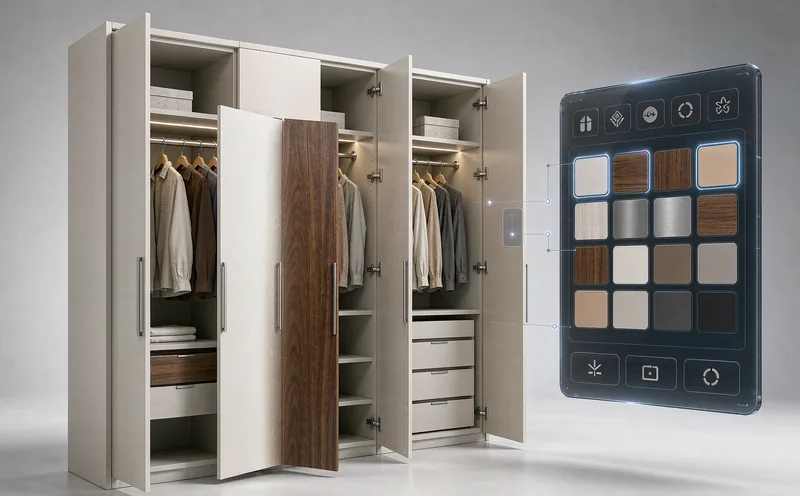
The hard part is not putting these four dimensions online. It is the constraints between them. Glass doors rule out certain interior accessories. Changing width should adjust shelf count and rod length automatically. Some finishes only exist in certain processes, so unsupported colors must never appear. Those rules live in a salesperson's head today; writing them into the system is where the real work sits, and where quotes between vendors differ by multiples.
Live pricing is the other half. Every option change updates the total, the buyer keeps budget in view, and the willingness to submit an inquiry rises visibly. Hiding prices to force a first message filters out the most sincere buyers first.
From Configuration to Quote and Inquiry
A configuration session should end in one artifact: a specification sheet. Door style, finish code, interior parts, outer dimensions, matching price, every line item explicit. That sheet is the inquiry. Sales receives a decision already made rather than "I want to learn about custom wardrobes", and how pricing ties to options is covered in our piece on quoting for custom furniture.
Brands gain a second asset: every option touched is preference data. Which door styles get picked most, which price bands hold attention longest, cheaper and more accurate than any survey. Buyers who configure their own wardrobe also behave differently after purchase, as our numbers on return rates and order value show.
Xuanji Animation has built online selection systems for custom furniture brands for years, across more than eight years and five hundred plus projects, with furniture a major share; the full process of one build is documented on the furniture 3D configurator case page. One recurring lesson: a configurator is not "product photos in 3D". Structuring the pairing rules and pricing logic that live in a salesperson's head is the bulk of the effort, and the reason quotes vary so widely between vendors.
To evaluate a specific product line, the custom 3D configurator development page has the entry point.
Related Q&A
What does a wardrobe 3D configurator cost?
Two variables dominate: how many cabinet models need modeling, and how complex the constraint and pricing logic is. A dozen standard models with common pairing rules versus hundreds of models with a full pricing system differ by multiples. The sane path is launching the flagship series first, validating, then expanding.
Does it work properly on phones?
Yes, and it has to be designed mobile-first. Most organic traffic for custom furniture arrives on phones, and rotating, recoloring and exploding the interior actually feel better on touch than with a mouse. The precondition is model weight, because every second of loading costs patience.
We already have showrooms. Is an online configurator still necessary?
They serve different people. Visitors already in the store have intent; the configurator catches those who have not visited, including buyers in other countries. For export and dealer scenarios especially, a page where someone can configure first and inquire second reduces the cost of first contact to almost nothing.