
Motorcycle 3D Configurator and Accessory Selection Development
A motorcycle 3D configurator turns body paint, top cases, crash bars and other accessories into online choices riders can switch, with the view changing as they select and a configuration list ready for inquiry.
Custom-built for motorcycle brands, accessory sellers and overseas sales, focused on visualizing paint and accessory selection with rules based on model fitment to avoid impossible combinations.
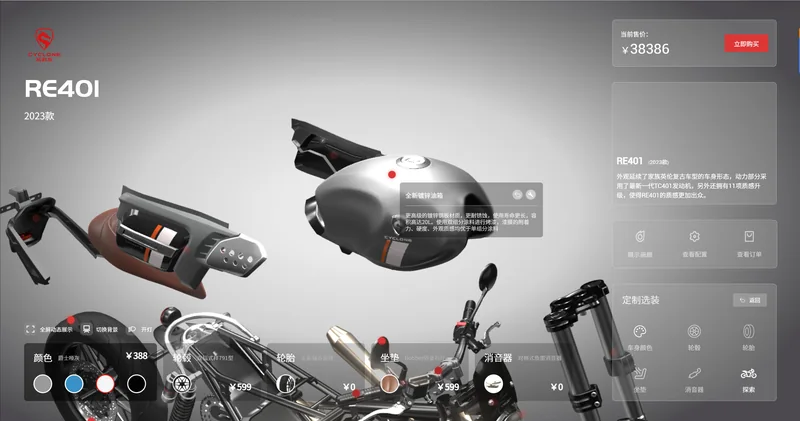
Motorcycle configuration preview: body paint and accessory combinations.
Online Display Needs for Motorcycles and Accessories
Changing paint, adding a top case, fitting crash bars or swapping handlebars makes a big difference, yet buyers usually see scattered accessory and bike photos and cannot tell if parts fit together or suit their model.
Putting the bike and accessories in one 3D interface lets riders see combinations as they select and reduces repeated "will this fit my bike" questions for sellers. For export business, a clear configuration page also lowers cross-language communication cost.
Effects Hard to Predict
See how paint and accessories look together while choosing.
Fitment Often Confused
Show accessories by compatible model to reduce wrong selections.
Inquiry Details Scattered
Organize selected accessories into a list for quoting.
Combining Body Colors, Cases and Accessories
Body colors switch within the official paint range, top cases by capacity and material, and crash bars, mudguards and handlebars can be added item by item; some kits apply as a set. What can be selected together depends on bike structure and fitment data.
Paint and material appearance varies across screens, so online views help compare directions; final colors are best confirmed against the real bike or samples. Implementation is covered in our 3D configurator development service.
Before development, we organize the accessory list, compatible models and exclusions into rules, then decide which parts need 3D and which details are clearer as text.
Body Paint
Preview official colors and special finishes.
Cases & Luggage
Combine capacity, material and mounting options.
Accessories
Compare crash bars, mudguards and handlebars item by item.
Model Fitment and Accessory Conflict Rules
Fitment is the key for motorcycle accessories. The same top case may fit only some models, certain crash bars cannot coexist with lower fairings, and add-ons can conflict in position. These relationships must be modeled from real fitment data for the configurator to offer installable combinations.
Once rules are clear, the page serves both rider self-configuration and accessory seller display and inquiry. Linking to product data and checkout is assessed per project interfaces.
Available accessories, compatible models and exclusions follow real data; the page makes no installation promise beyond the fitment range.
Configuration Lists and Inquiry Flow
Selected paint and accessories can be summarized into a configuration list submitted with the inquiry form so sellers can confirm fitment and quote. Compared with describing needs in text, a structured list is less likely to miss items.
Saved configurations, shareable links and ecommerce integration can be discussed as requirements; implementation depends on product rules and interfaces. More display approaches are covered in our interactive 3D product display service.
Connecting selection and inquiry into one path removes many intermediate steps between a rider browsing and asking.
Brand Websites
Display model paint and original accessory options.
Accessory Stores
Design selection around fitment and link to product pages.
Shows & Dealers
Demonstrate more accessory combinations with limited display bikes.
How Motorcycle 3D Configurators Are Developed
Start with one core model, get selection and inquiry working, then expand to more models and accessories. Scope, schedule and cost are subject to assessment and the project contract.
Define the Model
Confirm models, paint, accessories and fitment data.
Create Models
Build and optimize web-ready 3D assets from materials.
Develop Interactions
Implement option switching, fitment rules and data integration.
Test and Deliver
Check display across devices and the core flow.
Related Questions and Answers
Where does accessory fitment data come from?
Customers provide compatible-model and exclusion data; when none exists, rules can start with core models and key accessories and expand over time.
Can it be embedded in an existing store or site?
Integration is assessed against site architecture, product data and interfaces; price or cart synchronization is defined during requirements gathering.
Can it be made without 3D models?
Provide bike photos, accessory images and dimensions so we can assess modeling scope and propose a workable approach.
Ready to Start? Get Your Tailored Plan
Submit your requirements to receive a technical plan, timeline and budget within 24 hours.