
Medical Device 3D Product Display Development
Medical device 3D display turns appearance, internal structure, part functions and operation flow into an interactive web demo, with hotspots explaining each part and guiding customers through how the device is used.
Custom-built for medical device makers and overseas promotion, serving websites, trade shows and sales materials. Content focuses on structure and operation mockups; medical descriptions follow customer-reviewed materials with no efficacy or compliance claims.
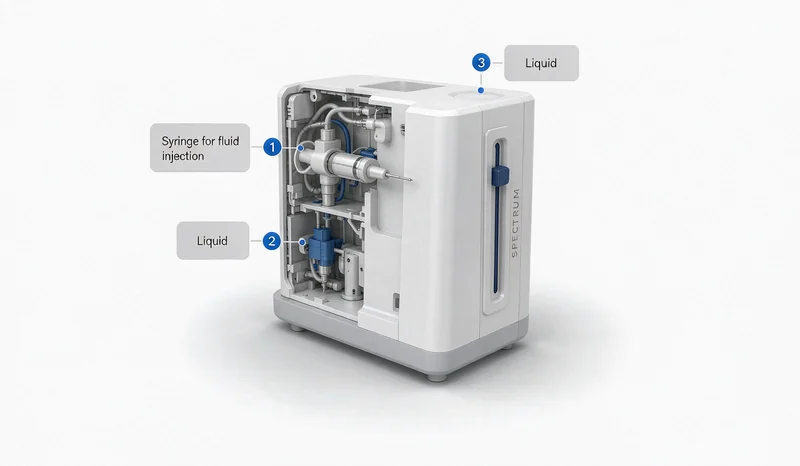
Medical device 3D preview: hotspots and operation demo (illustrative content).
Challenges in Online Medical Device Introduction
Medical devices have many parts and procedural steps. Photos and manuals alone make it hard for customers to understand structure and use before purchasing, while overseas buyers cannot visit and sales repeat the same explanation.
3D display lets customers explore appearance, open part descriptions and follow operation mockups at their own pace, turning an abstract introduction into an interactive process and standardizing the sales demo.
Complex Structure
View internal structure and part relationships by layer.
Procedural Flow
Show operation steps with animation.
Inconsistent Materials
Replace scattered images and documents with one demo.
Device Appearance, Structure and Function Hotspots
The device rotates for exterior viewing, internal structure is revealed by exploding or see-through views, and key parts carry hotspots with names and functions. Operation flows are animated step by step to explain basic use.
All medical descriptions, indications and parameters follow customer-reviewed materials; the page only mocks up structure and operation with no efficacy, diagnosis or compliance conclusions. Implementation is covered in our interactive 3D product display service.
We first confirm which parts can be disclosed and the wording with the customer, then decide what enters the 3D demo to keep expression accurate and clearly bounded.
Appearance & Structure
Rotate the device and view internals by layer.
Part Hotspots
Name and function labels on key parts.
Operation Mockup
Step-by-step animation of basic use.
Operation Flow and Part Animation
For devices needing usage explanation, animation can show operation order and part motion step by step, clearer than long text. Content follows customer-provided operation materials strictly, with no added steps or conclusions.
Such demos serve product communication and sales support and do not replace formal training, operation manuals or compliance documents.
Part descriptions, operation flow and indications follow customer-reviewed materials; no efficacy, diagnosis or certification claims.
Websites, Trade Shows and Sales Materials
On websites, interactive display embeds in product pages for self-service exploration; at trade shows, a touchscreen explains structure without a physical unit; in sales materials, a single link delivers a consistent demo to customers.
Scenarios demand different loading speeds and device adaptation, so we optimize for the target environment. Related scope is covered in our 3D software development service.
Explaining the device clearly while respecting content boundaries is the key to medical product display.
Product Websites
Embed in product pages to show structure and function.
Trade Shows
Touchscreen demos that reduce reliance on physical units.
Sales Materials
One link keeps the message consistent.
How Medical Device 3D Displays Are Developed
Start with one key product, get structure and operation demo working, then expand to other devices. Scope, schedule and cost are subject to assessment and the project contract.
Confirm Materials
Verify disclosable parts, operation data and review wording.
Create Models
Build and optimize 3D assets from drawings or materials.
Develop Interactions
Implement rotation, hotspots and operation animation.
Test and Deliver
Check display across devices and the demo flow.
Related Questions and Answers
Who reviews the medical content?
The customer provides and reviews part descriptions, operation flow and indications; the page follows reviewed content strictly.
Can the page replace user training?
No. The demo serves product communication and sales support and does not replace formal training, manuals or compliance documents.
Can it be made without 3D models?
Provide device drawings, photos and materials so we can assess modeling scope and propose a workable approach.
Ready to Start? Get Your Tailored Plan
Submit your requirements to receive a technical plan, timeline and budget within 24 hours.