
Product Material and Digital Color Swatch 3D Configurator Development
A 3D digital color swatch applies colors, textures and surface finishes to a product model so customers see an approximate effect on the product by selecting a color code, more intuitive than flipping paper cards.
Custom-built for coatings, furnishings, automotive color changes and any product with color options, serving brand sites and sales sampling. On-screen results are affected by lighting and devices and cannot replace physical samples.
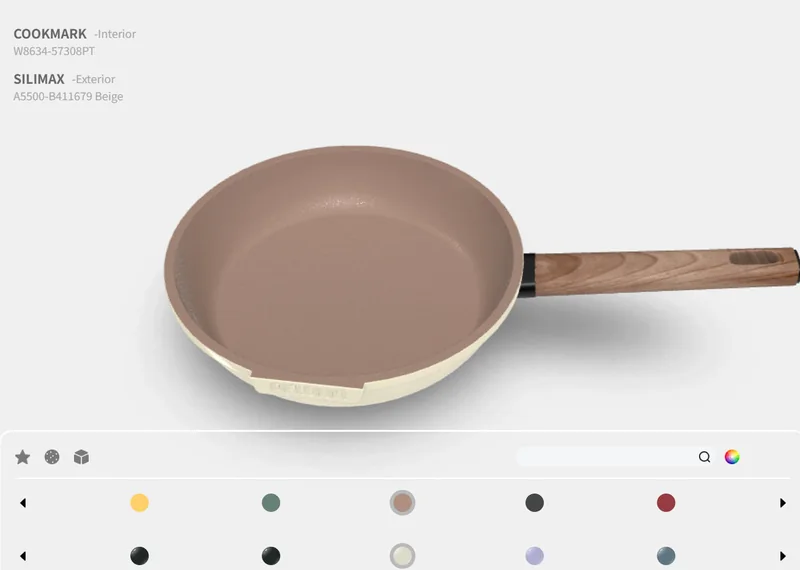
3D color swatch preview: colors and materials on products (appearance affected by screens).
Challenges Communicating Swatch and Real Effects
A color on paper is not the same as on a finished product. The same code looks different across materials and curves, so customers struggle to picture the final product from a card and sales keep explaining.
Applying color codes to a 3D model lets customers switch colors and see an approximate effect, giving both sides a shared reference. It improves sampling communication; final colors still need physical confirmation.
Cards Hard to Map
See an approximate effect of color codes on the product model.
Material Differences
Compare the same color across materials and finishes.
Repeated Sampling
Clarify preferences to reduce back-and-forth confirmation.
Switching Colors, Textures and Surface Finishes
Products switch by color-code library, while textures and finishes such as matte, gloss, metallic or wood grain can be compared, and some products allow independent coloring of different parts. What can change depends on product structure and available assets.
Screens, ambient light and devices all affect appearance, so online previews narrow choices while final colors and textures rely on physical samples. Implementation is covered in our 3D configurator development service.
Before development, we confirm color data, material lists and mapping relationships so the online display matches the swatch system.
Color Library
Switch product colors by code.
Textures & Finishes
Compare matte, gloss, metallic and wood grain.
Part Coloring
Show independent coloring for different areas.
Color Code Management and Product Combination Display
Companies with a swatch system often have hundreds of codes, so organizing, searching and applying them across products is the key challenge. Codes can be grouped by series, use or color family to help customers find target colors.
When showing product combinations, color-to-material mapping must be accurate so online selections match real codes. Data organization follows the company swatch management rules.
Whether a digital swatch works depends on accurate color, material and product mapping, not just attractive rendering.
Brand Websites and Sales Sampling
Brand websites show available product colors, sales use them to narrow choices quickly with customers, and dealers communicate on unified codes to reduce inconsistency across channels.
Linking to a color database, ordering or sampling workflows is assessed against system interfaces. More interaction approaches are covered in our interactive 3D product display service.
Turning color communication from imagination into something visible noticeably reduces repeated sampling steps.
Brand Websites
Show available colors and materials.
Sales Sampling
Narrow customer choices quickly.
Dealer Channels
Communicate on unified codes to reduce deviations.
How 3D Digital Color Swatch Projects Are Delivered
Start with a set of key colors and representative products, get sampling working, then expand to the full library. Scope, schedule and cost are subject to assessment and the project contract.
Organize Swatches
Confirm codes, materials and product mapping.
Create Models
Build and optimize product models with material appearance.
Develop Interactions
Implement color switching, material comparison and combination display.
Test and Deliver
Check display across devices and the sampling flow.
Related Questions and Answers
Can online colors exactly match physical ones?
Not guaranteed. Screens, lighting and material differences affect appearance; online previews compare directions and final colors rely on physical samples.
Can it connect to our color database?
Integration is assessed against system interfaces; data structure and sync scope are defined during requirements gathering.
Can all color codes be included?
They can be rolled out in batches by series or use, starting with common codes and key products before expanding.
Ready to Start? Get Your Tailored Plan
Submit your requirements to receive a technical plan, timeline and budget within 24 hours.