
Industrial Equipment Web3D Product Display Development
Industrial equipment Web3D display turns machine structure, part relationships and working processes into interactive demos users can rotate, zoom and explode in the browser, with hotspots explaining key parts on click.
Custom-built for equipment manufacturers and overseas enterprises, serving websites, trade shows and B2B inquiries. Model selection can be added as an optional module, but this is not a full industrial CPQ system.
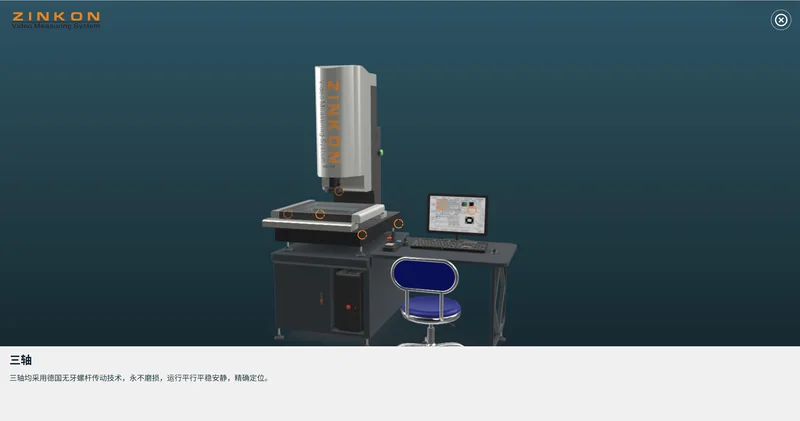
Industrial equipment Web3D preview: structure hotspots and exploded demonstration.
Why Industrial Equipment Needs Interactive Display
A machine has dozens of parts, and its working principle hides inside. A few exterior photos and a PDF catalog rarely explain it, and overseas customers cannot visit the factory while sales cannot demo every machine on site.
Web3D moves the equipment into the browser, where customers rotate, click hotspots and play exploded animations at their own pace. Sales teams standardize the demo and reduce repetitive explanation.
Structure Hidden
Show internal structure and part relationships via exploding and see-through views.
Principles Hard to Explain
Demonstrate key workflows with animation, clearer than text.
Low-Quality Inquiries
Visitors who saw the demo ask specific questions, improving communication.
Equipment Structure, Hotspots and Exploded Animation
The equipment can unfold by hierarchy: whole machine, core modules and internal parts. Hotspots sit on the relevant positions and reveal name, function or parameters on click; exploded animations follow the real assembly order to explain maintenance and composition.
Hotspot text and technical parameters follow customer-reviewed materials; the demo does not replace operation manuals or safety procedures. Interaction approaches are covered in our interactive 3D product display service.
We first map the parts and explanation sequence to highlight with the customer, then decide what uses hotspots, animation or text to avoid an information dump.
Machine & Modules
Layered view from exterior to core modules.
Hotspot Explanations
Names, functions and parameters on key parts.
Exploded Animation
Assembly-order demonstration of structure and maintenance.
Model Configuration and Accessory Selection Display
Some customers want to compare models or optional accessories alongside structure. This can be built as a module based on product rules, letting users switch models and see configuration differences; the page remains display and selection support.
Deep quoting and order generation, a full CPQ capability, are outside this page scope and can be assessed separately against interface conditions.
The page explains the equipment clearly; configuration and quoting are assessed on demand and not assumed for every project.
Serving Websites, Trade Shows and B2B Inquiries
On websites, interactive display embeds in product pages for self-service exploration; at trade shows, a touchscreen replaces part of the physical demo; for overseas inquiries, sales can send a link so customers see the demo before talking.
Different scenarios demand different loading speeds and device adaptation, so we optimize assets and interactions for the target environment. More scope is covered in our 3D software development service.
Explaining complex equipment clearly is itself an efficiency gain for sales.
Product Websites
Embed in product pages for self-service exploration.
Trade Shows
Touchscreen display reduces physical and staffing needs.
Sales Tools
Send a link for customer preview to speed up communication.
How Industrial Equipment Web3D Is Developed
Start with one representative machine, get structure and demo working, then expand to the product line. Scope, schedule and cost are subject to assessment and the project contract.
Review Materials
Confirm models, structure, key talking points and technical data.
Create Models
Build and optimize 3D assets from drawings or scan data.
Develop Interactions
Implement rotation, hotspots, explosion and optional selection modules.
Test and Deliver
Check loading speed across devices and the demo flow.
Related Questions and Answers
Can it be made from drawings without 3D models?
Yes. Drawings, photos or 3D source files can all be used to assess modeling; more complete materials give more accurate structure.
Can it show real working principles?
Yes, based on customer-confirmed materials; specific parameters and safety rules follow customer-reviewed content.
Can the page do model selection and quoting?
Selection and quoting are extension modules assessed against product rules and interfaces, not assumed in every project.
Ready to Start? Get Your Tailored Plan
Submit your requirements to receive a technical plan, timeline and budget within 24 hours.