
Energy Storage Cabinet 3D Product Display and Interaction Development
Energy storage cabinet 3D display turns cabinet opening, internal module layout and connection relationships into an interactive web demo, with hotspots explaining battery clusters, PCS or temperature control on click.
Custom-built for storage equipment makers and overseas projects, serving websites, trade shows and client presentations. Content focuses on structural visualization and solution differences, not engineering simulation or performance guarantees.
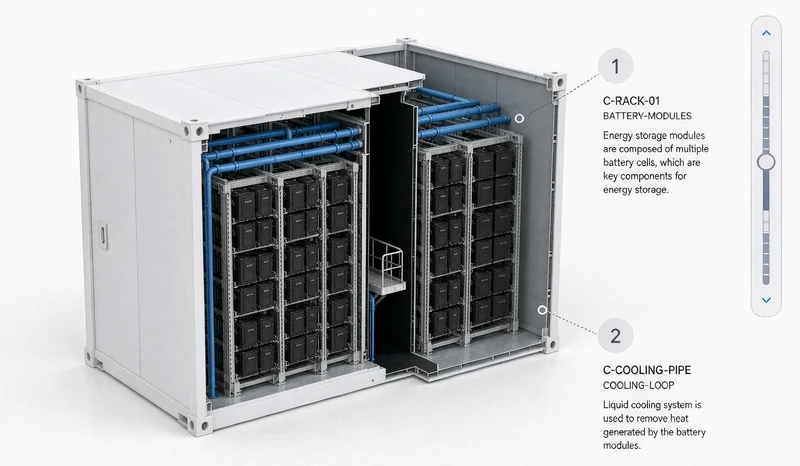
Energy storage cabinet 3D preview: structure and module hotspots (visual mockup).
Challenges in Storage Equipment Display and Sales
Storage cabinets look similar outside; the real differences are inside: module layout, capacity configuration, temperature control and connections. These hidden details are hard to explain with catalog images, and customers struggle to see how solutions differ.
3D display opens the cabinet and labels the modules so sales can explain against a clear visual and customers can explore on their own. For trade shows and overseas communication, this clarity beats static material.
Hidden Interior
Explore cabinet opening and module layout interactively.
Abstract Differences
Compare solution configurations through module combinations.
High Communication Cost
Explain against visuals to reduce repetition.
Cabinet Structure and Core Module Visualization
The cabinet opens in a real sequence, with battery clusters, PCS, temperature control and fire suppression labeled by hotspots and connections shown by mockup animation. What can be shown and how follows customer-confirmed materials and authorization.
This is a structural mockup, not engineering simulation, and carries no performance data guarantee. Interaction approaches are covered in our interactive 3D product display service.
Before development, we confirm which modules can be disclosed and the explanation wording, then decide what uses hotspots or animation to keep content accurate and compliant.
Cabinet Opening
Demonstrate doors and internal layout in real order.
Module Hotspots
Label battery clusters, PCS and temperature control.
Connection Mockup
Show relationships between modules with animation.
Displaying Solution Differences and Module Combinations
Storage projects are configured by capacity and application. The page can switch module combinations by solution so customers see configuration differences visually, helping sales explain selection directions early on.
Specific parameters, capacity and performance follow customer technical data; the page only visualizes and does not generate or infer figures.
Module content, connections and solution differences follow customer-confirmed materials; no engineering simulation or performance promise.
Websites, Trade Shows and Client Presentations
On websites, interactive display embeds in product pages for self-service structure exploration; at trade shows, a screen explains solutions without a physical unit; on client visits, a single link carries the demo along.
Scenarios demand different loading speeds and device adaptation, so we optimize assets and interactions for the target environment. Related scope is covered in our 3D software development service.
Making the invisible interior clear is often the most important step in storage project communication.
Product Websites
Embed in product pages to show cabinet and modules.
Trade Shows
Screen demos that reduce reliance on physical units.
Client Communication
Send a link to explain solutions and speed up discussion.
How Storage Cabinet 3D Displays Are Delivered
Start with one representative cabinet, get structure and solution demo working, then expand to more models. Scope, schedule and cost are subject to assessment and the project contract.
Confirm Materials
Verify disclosable modules, wording and technical data.
Create Models
Build and optimize 3D assets from drawings or materials.
Develop Interactions
Implement opening, hotspots, connection mockups and solution switching.
Test and Deliver
Check display across devices and the demo flow.
Related Questions and Answers
Does the content need customer review?
Yes. Module scope, hotspot text and solution differences follow customer-confirmed materials to keep content accurate and within authorization.
Can the page show performance data?
Performance and capacity data follow customer technical materials; the page visualizes structure and does not infer or promise performance.
Can it be made without existing models?
Provide cabinet drawings, photos or materials so we can assess modeling scope and propose a workable approach.
Ready to Start? Get Your Tailored Plan
Submit your requirements to receive a technical plan, timeline and budget within 24 hours.